
Standard operating procedures are the backbone of operational consistency. Every organization that delivers a product, provides a service, or manages a process depends on SOPs to ensure that work is performed correctly, safely, and consistently regardless of which employee is on the job. Without written procedures, organizations rely on tribal knowledge, and tribal knowledge walks out the door every time an experienced employee leaves.
The consequences of inadequate SOPs are measurable and serious. They include quality defects, safety incidents, regulatory violations, training inefficiency, customer complaints, and operational chaos during employee transitions. Organizations with mature SOP programs experience fewer errors, faster onboarding, more consistent quality, and better audit outcomes.
This guide provides a comprehensive SOP template with every section a well-structured procedure requires. You will find examples tailored to five different industries, formatting standards that improve readability and compliance, guidance on review and approval workflows, version control best practices, and strategies for integrating SOPs into employee training programs.
Whether you are writing your first SOP or overhauling an entire documentation system, this resource will help you create procedures that people actually follow.
What Is a Standard Operating Procedure?
A standard operating procedure is a written document that provides step-by-step instructions for performing a routine business activity. SOPs exist to ensure that work is completed consistently, efficiently, and in compliance with applicable regulations, quality standards, and organizational policies.
Key Characteristics of Effective SOPs
- Specific: Each step is detailed enough that a trained employee can follow it without guessing
- Measurable: Where applicable, steps include quantifiable standards, tolerances, or criteria
- Current: The procedure reflects actual current practice, not an outdated or aspirational process
- Accessible: The document is available at the point of use in a format employees can reference quickly
- Approved: The procedure has been reviewed, validated, and approved by appropriate authority
SOP vs. Policy vs. Work Instruction
Understanding the documentation hierarchy helps you write SOPs at the correct level of detail.
Policy: A high-level statement of organizational intent. Example: "All equipment must be inspected monthly."
SOP (Standard Operating Procedure): A process-level document that describes how a policy is implemented. Example: "Monthly Equipment Inspection Procedure" covering the schedule, responsibilities, inspection sequence, documentation requirements, and escalation protocol.
Work Instruction: A task-level document that provides granular, step-by-step directions for a specific task within an SOP. Example: "How to Calibrate the Model 7200 Pressure Sensor" with exact settings, tools, and acceptance criteria.
Comprehensive SOP Template
The following template includes every section that a well-structured SOP should contain. Not every SOP requires every section. Use your judgment based on the complexity of the procedure and the regulatory requirements of your industry.
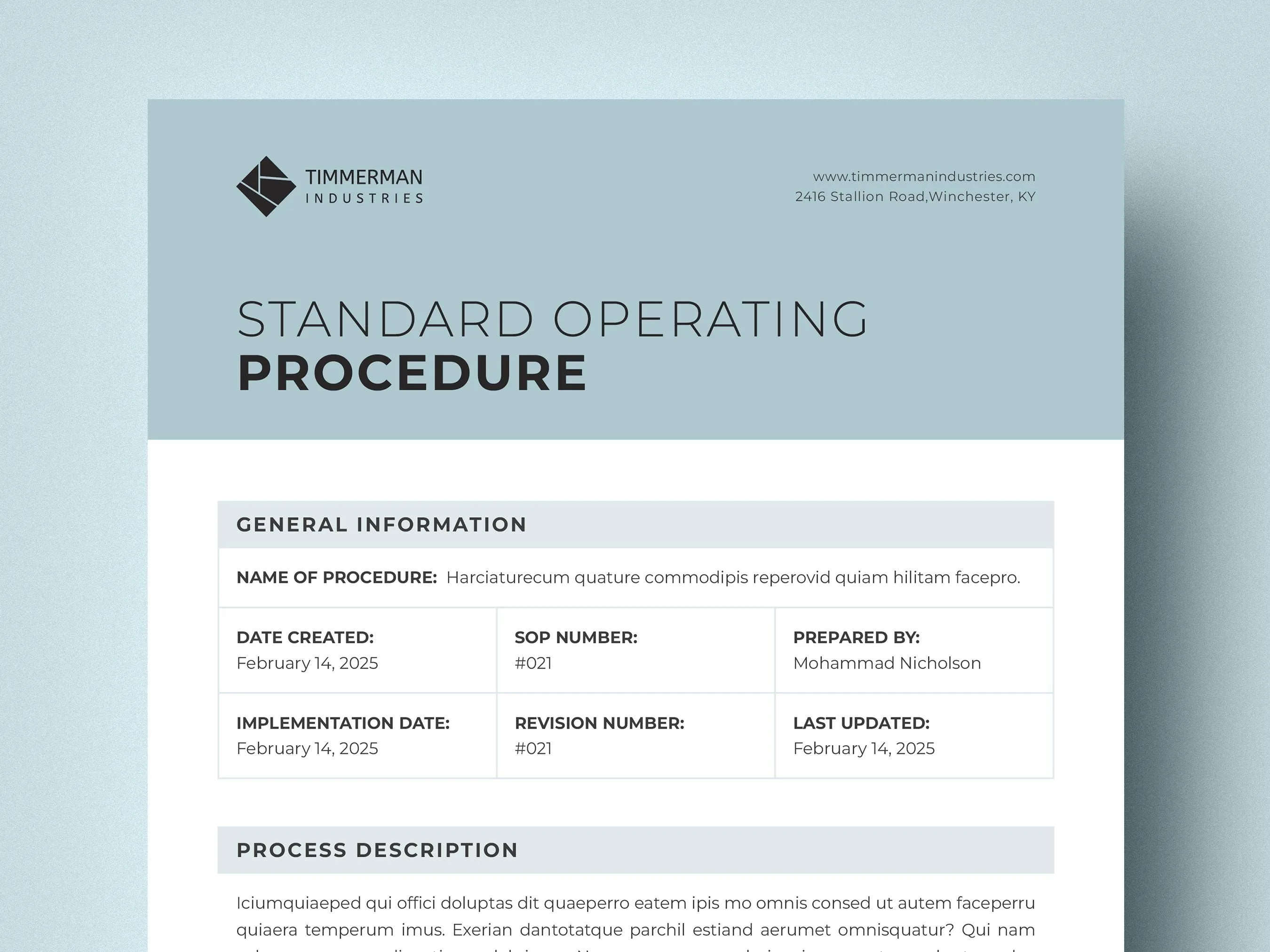
SOP Document Header
STANDARD OPERATING PROCEDURE


Document Number:    [SOP-DEPT-XXX]

Title:              [Procedure Title]

Department:         [Department Name]

Effective Date:     [MM/DD/YYYY]

Revision Number:    [X.X]

Last Reviewed:      [MM/DD/YYYY]

Next Review Date:   [MM/DD/YYYY]

Page:               [X of Y]


Prepared By:        [Name, Title]          Date: [MM/DD/YYYY]

Reviewed By:        [Name, Title]          Date: [MM/DD/YYYY]

Approved By:        [Name, Title]          Date: [MM/DD/YYYY]
Section 1: Purpose
State why this SOP exists and what it is designed to accomplish. The purpose section should be two to four sentences that clearly communicate the intent of the procedure.
Template:
The purpose of this Standard Operating Procedure is to establish a consistent process for [activity description]. This procedure ensures [quality/safety/compliance/efficiency outcome] by providing step-by-step instructions for [specific scope of the procedure]. Compliance with this SOP is [mandatory/recommended] for all personnel involved in [activity].
Section 2: Scope
Define the boundaries of the procedure. The scope tells the reader what is covered and, equally important, what is not covered.
Template:
This SOP applies to:
- [Department/team/role that must follow this procedure]
- [Specific activities or processes covered]
- [Equipment, products, or systems included]
- [Locations or facilities where this procedure applies]
This SOP does not apply to:
- [Activities or processes excluded from this procedure]
- [Departments or roles not subject to this procedure]
- [Exceptions or special circumstances handled by other procedures]
Section 3: Definitions and Abbreviations
Define any terms, acronyms, or abbreviations used in the document that the reader might not know. This section is especially important in regulated industries and for procedures used across departments.
Template:
Term
Definition
[Term 1]
[Definition]
[Term 2]
[Definition]
[Abbreviation 1]
[Full term and definition]
[Abbreviation 2]
[Full term and definition]
Section 4: Responsibilities
Clearly assign accountability for each role involved in the procedure. This section prevents the ambiguity that leads to missed steps and finger-pointing.
Template:
[Role 1: e.g., Department Manager]
- [Responsibility 1]
- [Responsibility 2]
- [Responsibility 3]
[Role 2: e.g., Line Operator]
- [Responsibility 1]
- [Responsibility 2]
- [Responsibility 3]
[Role 3: e.g., Quality Inspector]
- [Responsibility 1]
- [Responsibility 2]
- [Responsibility 3]
Section 5: Materials and Equipment
List everything needed to perform the procedure. This prevents interruptions caused by missing tools or supplies.
Template:
Required Equipment:
- [Equipment item 1] - [specification or model number]
- [Equipment item 2] - [specification or model number]
Required Materials:
- [Material 1] - [quantity/specification]
- [Material 2] - [quantity/specification]
Required Documents/Forms:
- [Document/form name] - [document number]
- [Document/form name] - [document number]
Required PPE (Personal Protective Equipment):
- [PPE item 1]
- [PPE item 2]
Section 6: Safety Warnings and Precautions
Document any safety hazards associated with the procedure and the precautions required to mitigate them. This section is critical for procedures involving chemicals, heavy equipment, electrical systems, or any other hazard.
Template:
WARNINGS:
- [Hazard description and consequence if not addressed]
- [Hazard description and consequence if not addressed]
CAUTIONS:
- [Precaution that prevents equipment damage or quality issues]
- [Precaution that prevents equipment damage or quality issues]
Required PPE for this procedure:
- [List of required personal protective equipment with specifications]
Emergency Procedures:
In the event of [emergency scenario], immediately [action]. Contact [emergency contact/number]. Refer to [emergency procedure document number].
Section 7: Procedure Steps
This is the core of the SOP. Write each step as a clear, actionable instruction. Use numbered steps for sequential procedures and bulleted lists for non-sequential collections of tasks.
Template:
7.1 Preparation
7.1.1 [First preparatory step with specific detail]
7.1.2 [Second preparatory step with specific detail]
7.1.3 [Third preparatory step with specific detail]
7.2 Execution
7.2.1 [First execution step with specific detail]
- [Sub-step or clarifying detail if needed]
- [Sub-step or clarifying detail if needed]
7.2.2 [Second execution step with specific detail]
7.2.3 [Third execution step with specific detail]
NOTE: [Important information that is not a step but affects how steps are performed]
7.2.4 [Fourth execution step with specific detail]
7.2.5 [Fifth execution step with specific detail]
DECISION POINT: If [condition A], proceed to step 7.2.6. If [condition B], proceed to step 7.3.
7.2.6 [Conditional step]
7.3 Completion and Documentation
7.3.1 [First completion step]
7.3.2 [Documentation requirement: Record [data] on [form name/number]]
7.3.3 [Final step: notification, handoff, or sign-off]
Section 8: Quality Control and Verification
Describe how compliance with the procedure is verified and how output quality is measured.
Template:
Verification Method: [How completion and quality are verified]
Acceptance Criteria: [Specific standards that must be met]
Frequency of Verification: [How often quality checks are performed]
Documentation: [Where verification results are recorded]
Non-conformance Procedure: If acceptance criteria are not met, [escalation and corrective action process, referencing applicable documents].
Section 9: References
List all documents, standards, regulations, and other SOPs referenced in or related to this procedure.
Template:
- [Document number]: [Document title]
- [Related SOP number]: [SOP title]
- [Equipment manual]: [Manual title and version]
Section 10: Revision History
Track every change made to the SOP over its lifecycle. This is essential for regulatory compliance and audit trails.
Template:
Revision Date Author Description of Changes 1.0 [Date] [Name] Initial release 1.1 [Date] [Name] [Description of change] 2.0 [Date] [Name] [Description of major revision]
Section 11: Appendices
Include supplementary materials that support the procedure but would disrupt the flow if included in the main body.
Common appendices:
- Flowcharts or process maps
- Blank forms and checklists
- Reference tables or charts
- Photographs or diagrams
- Training sign-off sheets
SOP Examples by Industry
Manufacturing SOP Example: CNC Machine Setup and Operation
STANDARD OPERATING PROCEDURE

Document Number:    SOP-MFG-042
Title:              CNC Milling Machine Setup and Operation
Department:         Manufacturing
Effective Date:     04/01/2026
Revision Number:    3.1

PURPOSE:
This SOP establishes the standard process for setting up and
operating CNC milling machines (Haas VF-2 and VF-4 models) in
the precision machining department. This procedure ensures
consistent part quality, operator safety, and machine longevity.

SCOPE:
This SOP applies to all CNC machine operators, setup technicians,
and supervisors in the precision machining department at Building
C, Lines 1 through 6.

RESPONSIBILITIES:
- Setup Technician: Performs machine setup per this procedure
- CNC Operator: Operates machine and monitors production per
  this procedure
- Shift Supervisor: Verifies setup approval and monitors compliance
- Quality Inspector: Performs first-article inspection per Section 7.3

PROCEDURE:

7.1 Pre-Setup
7.1.1 Review the work order and verify the part number, material
      specification, and required quantity.
7.1.2 Retrieve the correct CNC program from the network drive:
      \SERVER\CNC_Programs\[Part Number]\[Revision].
7.1.3 Verify the program revision matches the work order revision.
7.1.4 Gather all required tooling per the setup sheet. Inspect
      each cutting tool for wear or damage. Replace any tool that
      does not meet the acceptance criteria in Reference Table A.

7.2 Machine Setup
7.2.1 Power on the machine and perform the homing sequence.
7.2.2 Clean the worktable and vise with compressed air.
7.2.3 Install the correct vise or fixture per the setup sheet.
      Torque hold-down bolts to 45 ft-lbs using a calibrated
      torque wrench.
7.2.4 Load all tools into the tool magazine in the positions
      specified on the setup sheet.
7.2.5 Set tool length offsets using the tool length sensor.
      Verify each offset is within 0.0005 inches of the
      documented value.
7.2.6 Load the CNC program and verify the program number
      displayed matches the work order.
7.2.7 Set work coordinate offsets using the edge finder method.
      Record offset values on the Setup Verification Form
      (Form MFG-042-A).

7.3 First-Article Run
7.3.1 Run the program on a single part at 50 percent feed rate
      with the operator's hand on the feed hold button.
7.3.2 After completion, remove the part and deliver to the
      Quality Inspector for first-article inspection.
7.3.3 Do not begin production until the Quality Inspector signs
      the First Article Approval on Form MFG-042-A.

DECISION POINT: If first article passes inspection, proceed to
7.4. If first article fails, return to 7.2.5 to verify offsets
and repeat 7.3.

7.4 Production Run
7.4.1 Run production at programmed feed rates.
7.4.2 Inspect one part per 25 pieces using the go/no-go gauge
      specified on the work order.
7.4.3 Record inspection results on the In-Process Inspection
      Log (Form QC-015).
Healthcare SOP Example: Patient Medication Administration
STANDARD OPERATING PROCEDURE

Document Number:    SOP-NUR-018
Title:              Oral Medication Administration
Department:         Nursing
Effective Date:     04/01/2026
Revision Number:    5.0

PURPOSE:
This SOP establishes the standard process for administering oral
medications to patients in the inpatient setting. This procedure
ensures patient safety through consistent application of the
"Five Rights" of medication administration.

SCOPE:
This SOP applies to all registered nurses (RNs) and licensed
practical nurses (LPNs) in all inpatient units at Memorial
General Hospital.

SAFETY WARNINGS:
- Always verify patient identity using two unique identifiers
  before administering any medication.
- Check for documented allergies in the patient's electronic
  health record before every administration.
- Never administer a medication you did not personally prepare.
- Report any suspected adverse reaction immediately per the
  Adverse Event Reporting SOP (SOP-NUR-003).

PROCEDURE:

7.1 Preparation
7.1.1 Review the patient's current medication orders in the
      electronic health record (EHR).
7.1.2 Verify the order includes: drug name, dose, route,
      frequency, and prescribing physician signature.
7.1.3 Check the patient's documented allergy list. If the
      prescribed medication is in the same drug class as a
      documented allergy, do not administer. Contact the
      prescribing physician.
7.1.4 Retrieve the medication from the automated dispensing
      cabinet using your badge and PIN.

7.2 Verification (The Five Rights)
7.2.1 RIGHT PATIENT: Verify patient identity using the patient's
      name and date of birth. Compare the wristband to the
      medication administration record.
7.2.2 RIGHT MEDICATION: Compare the medication label to the
      order in the EHR. Verify drug name and concentration.
7.2.3 RIGHT DOSE: Verify the dose matches the order. If
      calculation is required, have a second nurse independently
      verify the calculation.
7.2.4 RIGHT ROUTE: Confirm the medication is ordered for oral
      administration.
7.2.5 RIGHT TIME: Verify the administration time falls within
      the facility's accepted window (30 minutes before or
      after the scheduled time).

7.3 Administration
7.3.1 Perform hand hygiene per the Hand Hygiene SOP (SOP-IC-001).
7.3.2 Enter the patient's room and introduce yourself.
7.3.3 Scan the patient's wristband barcode using the bedside
      medication verification system.
7.3.4 Scan the medication barcode. The system will display a
      verification screen. Confirm all five rights match.
7.3.5 Administer the medication to the patient with water
      unless contraindicated.
7.3.6 Observe the patient swallow the medication.
7.3.7 Document the administration in the EHR immediately,
      including time, dose, route, and your signature.

7.4 Post-Administration Monitoring
7.4.1 Monitor the patient for expected therapeutic effects and
      potential adverse reactions per the drug-specific
      monitoring parameters documented in the EHR.
7.4.2 If an adverse reaction is observed, follow the Adverse
      Event Response Protocol (SOP-NUR-003) immediately.
IT SOP Example: Server Deployment and Configuration
STANDARD OPERATING PROCEDURE

Document Number:    SOP-IT-027
Title:              Production Server Deployment and Configuration
Department:         Information Technology - Infrastructure
Effective Date:     04/01/2026
Revision Number:    4.2

PURPOSE:
This SOP establishes the standard process for deploying and
configuring new servers in the production environment. This
procedure ensures security compliance, configuration consistency,
and proper documentation of all production infrastructure.

SCOPE:
This SOP applies to all server deployments in the production
environment including physical servers, virtual machines, and
cloud instances (AWS, Azure). Development and staging
deployments are governed by SOP-IT-025.

RESPONSIBILITIES:
- Systems Engineer: Performs deployment per this procedure
- Security Team: Reviews and approves security configuration
- Change Manager: Approves the change request before deployment
- Infrastructure Manager: Final sign-off on production readiness

PROCEDURE:

7.1 Pre-Deployment
7.1.1 Verify that an approved Change Request (CR) exists for
      this deployment. Record the CR number: ____________.
7.1.2 Review the server specification document and confirm:
      - Operating system and version
      - CPU, memory, and storage requirements
      - Network configuration (VLAN, IP range, firewall rules)
      - Application software requirements
      - Backup and monitoring requirements
7.1.3 Verify that required resources are available in the
      target environment (rack space, network ports, IP
      addresses, storage allocation, licenses).

7.2 Base Configuration
7.2.1 Provision the server using the approved base image from
      the image repository: \IMGSERVER\BaseImages\[OS]\[Version].
7.2.2 Configure the hostname per the naming convention:
      [ENV]-[FUNCTION]-[LOCATION]-[NUMBER]
      Example: PRD-WEB-US1-042
7.2.3 Configure network interfaces per the specification
      document. Verify connectivity to the management network
      with a ping test to the gateway.
7.2.4 Join the server to the Active Directory domain.
7.2.5 Apply the latest approved security patches from WSUS/
      patch management server. Reboot if required.
7.2.6 Install and configure the monitoring agent (Datadog).
      Verify the server appears in the monitoring dashboard
      within 5 minutes.
7.2.7 Install and configure the backup agent. Verify the server
      appears in the backup console and schedule the first
      backup within 24 hours.

7.3 Security Hardening
7.3.1 Apply the CIS Benchmark hardening script for the
      applicable operating system. The script is located at:
      \SECTOOLS\Hardening\[OS]\current_version\.
7.3.2 Run the vulnerability scan using Tenable and generate
      the compliance report.
7.3.3 Review the scan results. All Critical and High findings
      must be remediated before production deployment.
7.3.4 Submit the scan report to the Security Team for review.
      Do not proceed until Security Team approval is received
      and documented in the CR.

7.4 Application Deployment
7.4.1 Install application software per the Application
      Deployment Guide (referenced in the CR).
7.4.2 Configure application settings per the environment
      configuration document.
7.4.3 Perform functional testing per the test plan documented
      in the CR. Record results on the Deployment Verification
      Checklist (Form IT-027-A).

7.5 Production Release
7.5.1 Obtain Infrastructure Manager sign-off on the Deployment
      Verification Checklist.
7.5.2 Update the Configuration Management Database (CMDB) with
      the new server details.
7.5.3 Update network documentation and diagrams.
7.5.4 Close the Change Request with deployment confirmation.
Food Service SOP Example: Food Receiving and Storage
STANDARD OPERATING PROCEDURE

Document Number:    SOP-FS-005
Title:              Food Receiving and Cold Storage
Department:         Kitchen Operations
Effective Date:     04/01/2026
Revision Number:    2.3

PURPOSE:
This SOP establishes the standard process for receiving food
deliveries and storing perishable items in cold storage. This
procedure ensures food safety compliance with the FDA Food Code
and local health department regulations.

SAFETY WARNINGS:
- Reject any delivery where cold items exceed 41 degrees F
  (5 degrees C) or frozen items show signs of thawing.
- Use cut-resistant gloves when opening cases with box cutters.
- Use proper lifting technique for cases exceeding 30 pounds.
  Request assistance for cases exceeding 50 pounds.

PROCEDURE:

7.1 Delivery Receiving
7.1.1 Verify the delivery matches the purchase order. Check
      item descriptions, quantities, and unit sizes against
      the PO document.
7.1.2 Inspect all packaging for damage, tears, pest evidence,
      or contamination. Reject and document any damaged items
      on the Delivery Exception Form (Form FS-005-A).
7.1.3 Using a calibrated probe thermometer, check the internal
      temperature of at least three refrigerated items per
      delivery. Acceptable range: 32 to 41 degrees F (0 to
      5 degrees C).
7.1.4 Check frozen items for firmness and ice crystal formation.
      Reject any item that is soft, shows discoloration, or has
      ice crystals on the surface indicating thaw-refreeze.
7.1.5 Verify expiration dates on all items. Reject any item
      within 3 days of expiration for perishable goods or
      within 30 days for shelf-stable goods.
7.1.6 Sign the delivery receipt only after all inspections are
      complete. Note any rejected items on the receipt before
      signing.

7.2 Cold Storage
7.2.1 Transfer all refrigerated and frozen items to appropriate
      storage within 15 minutes of receiving.
7.2.2 Label all items with the date received using the
      standardized food labels. Include: item name, received
      date, use-by date, and employee initials.
7.2.3 Store items following FIFO (First In, First Out) method.
      Place new stock behind existing stock of the same item.
7.2.4 Store items at the correct shelf height:
      - Top shelf: Ready-to-eat foods, prepared items
      - Middle shelves: Dairy, eggs, produce
      - Bottom shelf: Raw meats and poultry (to prevent
        cross-contamination from drips)
7.2.5 Verify walk-in refrigerator temperature reads between
      36 and 40 degrees F (2 to 4 degrees C). Verify walk-in
      freezer temperature reads 0 degrees F (-18 degrees C)
      or below.
7.2.6 Record temperatures on the Cold Storage Temperature Log
      (Form FS-003-B) posted inside the walk-in door.

DECISION POINT: If temperature is outside acceptable range,
do not store food. Notify the Kitchen Manager immediately.
Refer to Equipment Malfunction SOP (SOP-FS-012).
HR SOP Example: New Employee Onboarding
STANDARD OPERATING PROCEDURE

Document Number:    SOP-HR-008
Title:              New Employee Onboarding
Department:         Human Resources
Effective Date:     04/01/2026
Revision Number:    6.0

PURPOSE:
This SOP establishes the standard process for onboarding new
employees from offer acceptance through the completion of their
first 90 days. This procedure ensures legal compliance, consistent
orientation, and structured integration into the organization.

SCOPE:
This SOP applies to all new full-time and part-time employees
across all departments. Contractor and temporary worker
onboarding is governed by SOP-HR-015.

RESPONSIBILITIES:
- HR Coordinator: Manages administrative onboarding tasks
- Hiring Manager: Manages role-specific orientation and integration
- IT Department: Provisions equipment and system access
- Facilities: Prepares workspace
- Assigned Buddy: Provides peer-level guidance during first 90 days

PROCEDURE:

7.1 Pre-Start (5 to 10 Business Days Before Start Date)
7.1.1 Send the offer letter and employment agreement for
      signature via DocuSign.
7.1.2 Send the new hire welcome packet including:
      - First day logistics (time, location, parking, dress code)
      - Required documents for I-9 verification
      - Benefits enrollment information and deadlines
      - Employee handbook acknowledgment form
7.1.3 Submit IT provisioning request (Form IT-001) for:
      - Laptop/desktop per department standard
      - Email account and Microsoft 365 license
      - System access per the Role-Based Access Matrix
      - Phone/extension assignment
7.1.4 Submit facilities request (Form FAC-003) for:
      - Workspace assignment and setup
      - Building access badge
      - Parking access (if applicable)
      - Office supplies and equipment
7.1.5 Notify the hiring manager to prepare:
      - 30/60/90 day goals document
      - Meeting schedule with key stakeholders for first two weeks
      - Buddy assignment

7.2 Day One
7.2.1 Meet the new employee at reception at the scheduled
      arrival time.
7.2.2 Complete I-9 verification. Review original documents
      per acceptable document list. This must be completed
      within 3 business days of start date per federal law.
7.2.3 Complete remaining new hire paperwork:
      - W-4 federal tax withholding
      - State tax withholding form
      - Direct deposit authorization
      - Emergency contact information
      - Employee handbook acknowledgment
7.2.4 Conduct HR orientation covering:
      - Company overview and organizational structure
      - Benefits enrollment (deadline: 30 days from start)
      - Time and attendance policies
      - PTO and leave policies
      - Code of conduct and ethics
      - Safety and emergency procedures
      - Anti-harassment and discrimination policies
7.2.5 Escort the employee to their workspace and introduce
      them to their manager and buddy.
7.2.6 Hiring manager conducts department orientation covering:
      - Team introductions
      - Department mission and current priorities
      - Role expectations and 30/60/90 day goals review
      - Tour of department-specific facilities
      - Introduction to key systems and tools

7.3 First Week (Days 2 through 5)
7.3.1 Complete required compliance training:
      - Information security awareness
      - Anti-harassment training
      - Safety training (role-specific)
      - Data privacy and confidentiality
7.3.2 Hiring manager schedules meetings with key cross-
      functional partners.
7.3.3 Buddy checks in daily during the first week to answer
      questions and provide guidance.
7.3.4 HR Coordinator verifies all system access is functional
      and resolves any provisioning issues.

7.4 30/60/90 Day Check-ins
7.4.1 Day 30: HR Coordinator sends the 30-Day Check-in Survey
      to the new employee.
7.4.2 Day 30: Hiring manager conducts a formal check-in meeting
      to review progress against 30-day goals and address any
      concerns.
7.4.3 Day 60: Hiring manager conducts a progress review against
      60-day goals. Document performance observations.
7.4.4 Day 90: Hiring manager conducts the 90-day performance
      review using Form HR-008-C. This review determines
      confirmation of employment for employees in their
      probationary period.
7.4.5 HR Coordinator closes the onboarding file and transfers
      the employee record to the active personnel file.
SOP Formatting Standards
Consistent formatting across all SOPs improves readability, reduces training time, and demonstrates organizational maturity to auditors and regulators.
Document Numbering Convention
Establish a consistent numbering system that identifies the department, document type, and sequence number. Example: SOP-MFG-042 where SOP indicates the document type, MFG indicates the department, and 042 is the sequence number.
Section Numbering
Use a hierarchical numbering system that makes it easy to reference specific steps. The most common format:
- Section 7: Major section (e.g., Procedure)
- 7.1: Sub-section (e.g., Preparation)
- 7.1.1: Individual step
- 7.1.1.1: Sub-step (use sparingly; more than four levels indicates the procedure should be split)
Page Layout
- Use consistent margins (1 inch is standard)
- Include header with document number, title, revision, and page number on every page
- Use a standard font (Arial 11pt or Calibri 11pt for body text)
- Use bold for section headings and warnings
- Include adequate white space between sections
- Use tables for structured data rather than embedding it in paragraphs
Visual Elements
- Flowcharts: Include a process flowchart at the beginning of complex procedures to provide an overview before the detailed steps
- Photographs: Use photographs to show correct equipment setup, proper hand positions, or acceptable vs. unacceptable outcomes
- Diagrams: Include diagrams for spatial procedures (storage layouts, equipment positioning, wiring configurations)
- Warning symbols: Use standardized hazard symbols for safety warnings
Language Standards
- Write in imperative mood (command form): "Open the valve" not "The operator should open the valve"
- Use active voice throughout
- Keep sentences short (15 to 20 words maximum for procedural steps)
- Define technical terms on first use
- Be specific: "Torque to 45 ft-lbs" not "Tighten securely"
- One action per step: Do not combine multiple actions in a single numbered step
Review and Approval Process
SOPs without a formal review and approval process are unreliable documents that may contain errors, outdated information, or instructions that conflict with current practice. Establish a structured review process and follow it without exception.
Review Cycle
Scheduled reviews: Every SOP should be reviewed at a defined interval, typically annually. The review verifies that the procedure still reflects current practice, that referenced documents are current, and that assigned roles and responsibilities remain accurate.
Triggered reviews: Certain events should trigger an immediate review outside the scheduled cycle:
- Process changes (new equipment, software, methods, or materials)
- Regulatory or compliance requirement changes
- Audit findings or non-conformance reports
- Safety incidents related to the procedure
- Organizational restructuring affecting roles
- Employee feedback identifying errors or improvement opportunities
Approval Workflow
A standard approval workflow includes three roles:
Author: The subject matter expert who writes or revises the SOP. This should be someone who performs or directly supervises the procedure.
Reviewer: A peer or technical expert who verifies the accuracy and completeness of the procedure. The reviewer should be knowledgeable about the process but ideally not the same person who wrote it.
Approver: A manager with authority to approve the procedure for use. The approver verifies that the SOP aligns with organizational policies, regulatory requirements, and quality standards.
Review Documentation
Document every review, even when no changes are made. The review record should include:
- Date of review
- Reviewer name and title
- Outcome (approved as-is, approved with changes, or requires major revision)
- Summary of changes made (if any)
- Next scheduled review date
Version Control Best Practices
Version control ensures that employees always have access to the current approved version and that a complete history of changes is maintained for audit purposes.
Numbering Convention
Use a two-part version number: Major.Minor
- Major version (1.0, 2.0, 3.0): Significant changes that alter the procedure steps, add or remove sections, or change the scope
- Minor version (1.1, 1.2, 1.3): Corrections, clarifications, formatting changes, or updates to referenced documents that do not change the procedure itself
Distribution Control
- Maintain a master list of all SOPs with their current version numbers, effective dates, and assigned review dates
- Distribute SOPs through a controlled document management system rather than email or shared drives where outdated versions can persist
- When a new version is released, ensure all previous versions are clearly marked as obsolete or archived
- If paper copies are used at workstations, implement a process for replacing outdated copies when new versions are released
- Assign a document control coordinator responsible for maintaining the master list and managing distribution
Digital Document Management
For organizations using electronic document management:
- Use a system with access controls that prevents unauthorized editing
- Implement electronic signature capability for approvals
- Maintain automatic version history with the ability to view any previous version
- Set up automated notifications for upcoming review dates
- Use read-receipt tracking to verify that affected employees have accessed the updated version
Training Integration
The best-written SOP is worthless if employees are not trained on it. Integrate SOP training into your organization's learning and development processes.
Initial Training
When a new SOP is released, all affected employees must be trained before the effective date. Training should include:
- Classroom or briefing session: Walk through the SOP, explain the rationale for each section, and answer questions
- Hands-on demonstration: For procedural SOPs, demonstrate the procedure step by step
- Supervised practice: Have employees perform the procedure under observation until they demonstrate competence
- Competency assessment: Verify understanding through a written quiz, practical evaluation, or both
Ongoing Training
- Conduct refresher training when SOPs are revised
- Include SOP review in annual competency assessments
- Incorporate SOP compliance observation into regular quality audits
- Address SOP deviations immediately through retraining rather than only through corrective action
Training Documentation
Maintain records of all SOP training including:
- Employee name and ID
- SOP document number and version
- Date of training
- Training method (classroom, on-the-job, online)
- Trainer name
- Competency assessment results
- Employee signature acknowledging training completion
Common SOP Writing Mistakes
Mistake 1: Writing at the Wrong Level of Detail
SOPs that are too vague leave employees guessing. SOPs that are too detailed become unusable walls of text. The right level of detail assumes the reader has the baseline training for their role but needs guidance on the specific procedure. If a step requires more than three sub-steps, consider creating a separate work instruction and referencing it from the SOP.
Mistake 2: Writing from Memory Instead of Observation
Procedures written at a desk from memory almost always omit steps that the writer performs automatically. The most accurate SOPs are written by someone who observes the procedure being performed in real time and documents each action as it happens.
Mistake 3: Not Involving the People Who Do the Work
SOPs written by managers or quality professionals without input from frontline employees frequently describe an idealized process rather than the actual process. The people who perform the work daily know the practical realities, the common problems, and the workarounds that make the process function. Include them in writing and reviewing every SOP.
Mistake 4: Neglecting to Update
An SOP that does not reflect current practice is dangerous. It can lead to compliance violations when auditors compare the written procedure to observed practice and find discrepancies. It can cause errors when new employees follow outdated instructions. Set and respect review schedules.
Mistake 5: Making SOPs Inaccessible
If employees cannot quickly find and reference the SOP they need, they will rely on memory instead. Store SOPs in a searchable system accessible from the point of use. For manufacturing and food service, consider laminated quick-reference cards posted at workstations that summarize key steps with references to the full SOP.
Mistake 6: Combining Multiple Procedures in One Document
An SOP that covers too many procedures becomes unwieldy and difficult to maintain. Each SOP should cover a single process or closely related set of steps. If your SOP exceeds 10 pages, consider whether it should be split into multiple documents.
SOP Implementation Checklist
Before releasing any new or revised SOP, verify every item:
- The procedure has been observed in practice to verify accuracy
- All steps are written in imperative mood with one action per step
- Safety warnings and precautions are prominently placed before relevant steps
- Roles and responsibilities are clearly assigned
- All referenced documents, forms, and equipment are identified by name and number
- The document header includes all required fields (number, title, dates, signatures)
- Revision history is complete and accurate
- The document has been reviewed by a subject matter expert
- The document has been approved by the appropriate authority
- Affected employees have been identified and training has been scheduled
- The previous version has been archived and marked obsolete
- The document management system has been updated with the current version
- Physical copies at workstations have been replaced (if applicable)
Standard operating procedures are the foundation of operational excellence. They transform institutional knowledge into organizational assets that survive employee turnover, enable consistent quality, support regulatory compliance, and provide the basis for continuous improvement.
The investment required to write, maintain, and train on SOPs pays returns every day in the form of fewer errors, safer operations, faster onboarding, and more reliable outcomes. Build your SOP program methodically using the templates and guidance in this resource, and you will build an organization that executes with consistency and confidence.
Frequently Asked Questions
What is the difference between an SOP and a work instruction?
SOPs and work instructions serve related but distinct purposes within a documentation hierarchy. An SOP is a higher-level document that describes the overall process, its purpose, the roles responsible, and the sequence of major steps required to complete a business activity. It answers the what and why at a process level.
A work instruction is a more granular document that provides extremely detailed, step-by-step directions for completing a single specific task within that process.
It answers exactly how at a task level. For example, an SOP for equipment maintenance might outline the monthly inspection schedule, assign responsibilities, and list the major stages of the maintenance process.
A corresponding work instruction would detail precisely how to calibrate a specific piece of equipment, including exact settings, tool requirements, and measurement tolerances. Organizations typically need both levels of documentation to ensure consistency and compliance.
How often should SOPs be reviewed and updated?
Best practice dictates that SOPs should be reviewed on a scheduled basis, with most regulatory frameworks and quality management systems requiring annual reviews at minimum. However, several events should trigger immediate review outside the regular cycle.
These include process changes driven by new equipment, software, or methods, regulatory or compliance requirement updates, audit findings or non-conformance reports, incident investigations that reveal procedural gaps, organizational restructuring that affects roles and responsibilities, and feedback from employees who identify errors or improvement opportunities.
Each review should verify that the procedure still accurately reflects current practice, that all referenced documents and forms are current, and that assigned roles still exist within the organization. Document the review outcome even if no changes are needed, as this creates an audit trail showing the SOP was evaluated and confirmed as current.
How do I get employees to actually follow SOPs?
Employee compliance with SOPs is one of the most persistent challenges in operations management, and the solution requires addressing both the documentation quality and the organizational culture. First, involve the people who actually perform the work in writing and reviewing the SOP. Procedures written by managers without frontline input are frequently impractical and ignored.
Second, write SOPs in clear, simple language with visual aids like photos, diagrams, and flowcharts.
Dense text-heavy procedures discourage reading. Third, integrate SOP training into onboarding and schedule periodic refresher sessions, especially after updates.
Fourth, make SOPs easily accessible at the point of use through digital systems, posted quick-reference cards, or laminated summaries at workstations. Fifth, create accountability by tracking compliance through audits and observations while also recognizing employees who consistently follow procedures. The goal is making the correct procedure the easiest path to follow.