
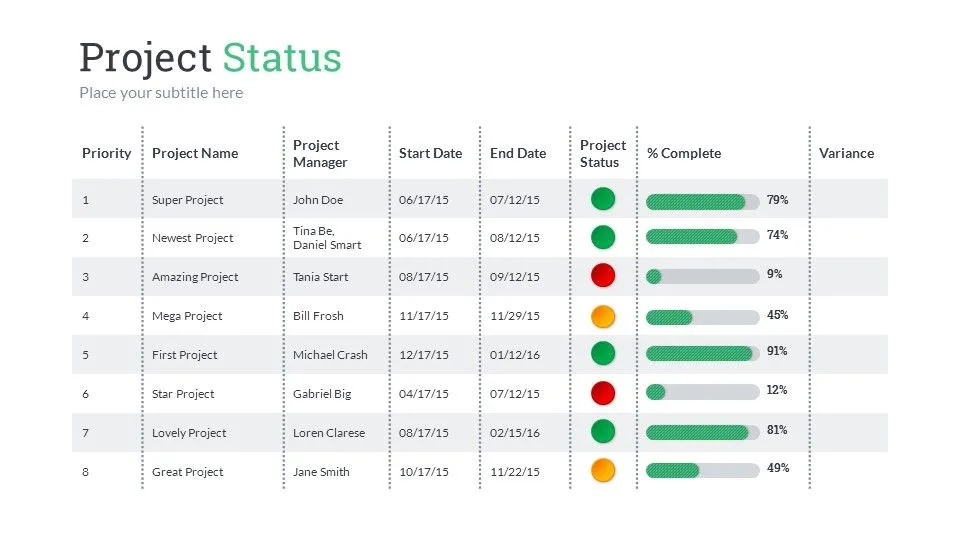
A project status update is the connective tissue between a project team and its stakeholders. It communicates progress, surfaces risks, and provides the information that sponsors and executives need to make decisions and allocate resources. Yet most status updates fail at their fundamental purpose. They either drone on with irrelevant detail that no one reads, or they present a varnished version of reality that leaves stakeholders uninformed and unprepared for problems.
The difference between a status update that gets ignored and one that drives action comes down to structure, honesty, and audience awareness. This guide provides complete templates for weekly updates, monthly reports, and executive dashboards, along with practical examples for software projects, construction, and marketing campaigns.
The Purpose of a Project Status Update
Before writing a status update, understand what it is supposed to accomplish.
Inform Decision-Makers
The primary audience for most status updates is not the project team but the people above and around the project who control resources, budgets, and priorities. These stakeholders need enough information to make decisions without being buried in operational detail.
Create Accountability
A written record of what was accomplished, what is planned, and what is at risk creates accountability for both the project team and the stakeholders who receive it. When a risk is documented in a status update and later materializes, the record shows that the team identified and communicated the issue.
Surface Issues Early
Status updates are the formal mechanism for escalating problems before they become crises. A well-written update gives stakeholders the opportunity to intervene, reallocate resources, or adjust expectations while there is still time to make a difference.
Maintain Stakeholder Confidence
Regular, honest communication builds trust. Stakeholders who receive consistent, transparent updates are far more supportive when problems arise than those who are kept in the dark until a crisis forces disclosure.
The RAG Status Framework
The RAG (Red, Amber, Green) framework is the most widely used system for communicating project health at a glance.
Green - On Track
The project is proceeding according to plan. All milestones are on schedule, the budget is within approved parameters, and no significant risks require escalation. Green does not mean there are no issues. It means that existing issues are being managed within the project team's authority and capacity.
Amber - At Risk
The project is experiencing issues that could impact the timeline, budget, or scope if not addressed. Amber status signals that stakeholder attention or support may be needed. Use Amber when:
- A milestone is at risk of being missed by more than one week
- Budget utilization is trending 10 to 15 percent above plan
- A dependency is delayed and the impact is being assessed
- A key team member has become unavailable
- A risk has materialized but mitigation is underway
Red - Off Track
The project has deviated significantly from the plan and requires immediate stakeholder intervention. Use Red when:
- A critical milestone has been missed or will be missed
- Budget overrun exceeds 15 percent with no approved contingency
- A showstopper issue has been identified with no clear resolution
- The project scope has changed materially without formal approval
- The project is at risk of failing to deliver its core objectives
Common RAG Mistakes
- Watermelon status - Green on the outside, red on the inside. This happens when project managers are reluctant to change status for fear of negative reactions. It destroys credibility when the truth eventually emerges
- Yo-yo status - Changing from Green to Red and back to Green every week signals poor assessment methodology. Use Amber as a transition state
- Permanent Amber - Some projects sit at Amber for months without resolution. If an issue persists for more than two reporting cycles, it should either be resolved (return to Green) or escalated (move to Red)
Weekly Project Status Update Template
The weekly update is the most common reporting cadence for active projects. It should be concise enough to read in under three minutes.
PROJECT STATUS UPDATE - WEEKLY

Project: [Project Name]
Report Period: [Week of Month Day, Year]
Project Manager: [Name]
Overall Status: [GREEN / AMBER / RED]

Status Summary:
[Two to three sentences providing a high-level narrative of
project health. This is the most important element - write it
as if the reader will read nothing else.]

SCHEDULE STATUS: [GREEN / AMBER / RED]
Current Phase: [Phase name]
Milestone Progress:
- [Milestone 1]: [Complete / On Track / At Risk / Delayed]
- [Milestone 2]: [Complete / On Track / At Risk / Delayed]
- [Milestone 3]: [Complete / On Track / At Risk / Delayed]

BUDGET STATUS: [GREEN / AMBER / RED]
Approved Budget: $[amount]
Spent to Date: $[amount] ([X]%)
Forecast at Completion: $[amount]
Variance: $[amount] ([X]% [over/under])

KEY ACCOMPLISHMENTS THIS WEEK
- [Accomplishment 1]
- [Accomplishment 2]
- [Accomplishment 3]

PLANNED ACTIVITIES NEXT WEEK
- [Activity 1]
- [Activity 2]
- [Activity 3]

RISKS AND ISSUES
| ID   | Description         | Impact  | Likelihood | Owner    | Mitigation            | Status     |
|------|---------------------|---------|------------|----------|-----------------------|------------|
| R-01 | [Risk description]  | [H/M/L] | [H/M/L]   | [Name]   | [Mitigation plan]     | [Status]   |
| I-01 | [Issue description] | [H/M/L] | N/A        | [Name]   | [Resolution plan]     | [Status]   |

DECISIONS NEEDED
- [Decision 1]: [Context and options. Needed by: Date]
- [Decision 2]: [Context and options. Needed by: Date]

DEPENDENCIES
- [Dependency 1]: [Status and impact if delayed]
- [Dependency 2]: [Status and impact if delayed]
Weekly Status Update Example - Software Development Project
PROJECT STATUS UPDATE - WEEKLY

Project: Customer Portal Redesign (Project Atlas)
Report Period: Week of March 16, 2026
Project Manager: Sarah Chen
Overall Status: AMBER

Status Summary:
The project is progressing well on development tasks but the
third-party payment gateway integration is blocked pending API
documentation from the vendor (expected March 21). If the
documentation is not received by March 24, the April 15 beta
launch date is at risk. All other workstreams remain on track.

SCHEDULE STATUS: AMBER
Current Phase: Development Sprint 6 of 8
Milestone Progress:
- User Authentication Module: Complete
- Dashboard and Analytics: Complete
- Account Management: On Track (85% complete)
- Payment Gateway Integration: At Risk (blocked by vendor)
- User Acceptance Testing: On Track (scheduled April 1)
- Beta Launch: At Risk (dependent on payment integration)

BUDGET STATUS: GREEN
Approved Budget: $340,000
Spent to Date: $218,000 (64%)
Forecast at Completion: $335,000
Variance: -$5,000 (1.5% under budget)

KEY ACCOMPLISHMENTS THIS WEEK
- Completed account management API endpoints (12 of 12)
- Deployed dashboard analytics module to staging environment
- Resolved 14 QA defects from Sprint 5 testing cycle
- Completed accessibility audit for authentication flows
  (WCAG 2.1 AA compliant)

PLANNED ACTIVITIES NEXT WEEK
- Begin payment gateway integration upon receipt of vendor API
  documentation
- Complete account management front-end components
- Execute performance testing on dashboard analytics module
- Begin preparing UAT test scripts and test data

RISKS AND ISSUES
| ID   | Description                          | Impact | Likelihood | Owner       | Mitigation                           | Status      |
|------|--------------------------------------|--------|------------|-------------|--------------------------------------|-------------|
| R-03 | Payment vendor API docs delayed      | High   | Medium     | Sarah Chen  | Daily follow-up with vendor; parallel | Monitoring  |
|      |                                      |        |            |             | development of mock integration       |             |
| R-05 | UAT resource availability uncertain  | Medium | Low        | Tom Lee     | Backup testers identified from QA team| Monitoring  |
| I-02 | Staging server memory insufficient   | Medium | N/A        | DevOps team | Request approved, upgrade scheduled   | In Progress |
|      | for full integration testing         |        |            |             | for March 20                          |             |

DECISIONS NEEDED
- Fallback plan for payment integration: If vendor documentation
  is not received by March 24, should we (a) delay beta launch
  by one week, or (b) launch beta without payment functionality
  and add it in the first post-launch release? Decision needed
  by: March 25.

DEPENDENCIES
- Payment Gateway API Documentation (Vendor: PayStream):
  Expected March 21. If delayed beyond March 24, beta launch
  date is at risk.
- Infrastructure upgrade (Internal DevOps): Approved and
  scheduled for March 20. No concerns.
Monthly Project Status Report Template
Monthly reports provide a broader view of project health and are typically distributed to a wider audience including executive sponsors and steering committees.
PROJECT STATUS REPORT - MONTHLY

Project: [Project Name]
Report Period: [Month Year]
Project Manager: [Name]
Sponsor: [Name]
Overall Status: [GREEN / AMBER / RED]
Previous Month Status: [GREEN / AMBER / RED]

EXECUTIVE SUMMARY
[Three to five sentences summarizing the month's progress,
current project health, and any items requiring executive
attention. This section should stand alone as a complete
briefing.]

PROJECT HEALTH DASHBOARD
| Category     | Status  | Trend     | Comments                    |
|--------------|---------|-----------|------------------------------|
| Schedule     | [RAG]   | [Up/Down/Stable] | [One-line comment]   |
| Budget       | [RAG]   | [Up/Down/Stable] | [One-line comment]   |
| Scope        | [RAG]   | [Up/Down/Stable] | [One-line comment]   |
| Resources    | [RAG]   | [Up/Down/Stable] | [One-line comment]   |
| Quality      | [RAG]   | [Up/Down/Stable] | [One-line comment]   |
| Stakeholders | [RAG]   | [Up/Down/Stable] | [One-line comment]   |

MILESTONE TRACKER
| Milestone              | Planned Date | Revised Date | Status     |
|------------------------|--------------|--------------|------------|
| [Milestone 1]          | [Date]       | [Date or -] | [Status]   |
| [Milestone 2]          | [Date]       | [Date or -] | [Status]   |
| [Milestone 3]          | [Date]       | [Date or -] | [Status]   |
| [Milestone 4]          | [Date]       | [Date or -] | [Status]   |

BUDGET SUMMARY
| Category             | Budget    | Actual    | Variance   | % Used |
|----------------------|-----------|-----------|------------|--------|
| Labor                | $[amt]    | $[amt]    | $[amt]     | [X]%   |
| Software/Licenses    | $[amt]    | $[amt]    | $[amt]     | [X]%   |
| Hardware             | $[amt]    | $[amt]    | $[amt]     | [X]%   |
| External Services    | $[amt]    | $[amt]    | $[amt]     | [X]%   |
| Contingency          | $[amt]    | $[amt]    | $[amt]     | [X]%   |
| TOTAL                | $[amt]    | $[amt]    | $[amt]     | [X]%   |

KEY ACCOMPLISHMENTS
1. [Accomplishment 1 with measurable outcome]
2. [Accomplishment 2 with measurable outcome]
3. [Accomplishment 3 with measurable outcome]
4. [Accomplishment 4 with measurable outcome]

PLANNED ACTIVITIES - NEXT MONTH
1. [Activity 1 with expected completion]
2. [Activity 2 with expected completion]
3. [Activity 3 with expected completion]

RISK REGISTER (Top 5)
| ID   | Risk                | Probability | Impact | Score | Owner   | Mitigation         | Status     |
|------|---------------------|-------------|--------|-------|---------|--------------------|------------|
| R-01 | [Description]       | [1-5]       | [1-5]  | [X]   | [Name]  | [Plan]             | [Status]   |
| R-02 | [Description]       | [1-5]       | [1-5]  | [X]   | [Name]  | [Plan]             | [Status]   |
| R-03 | [Description]       | [1-5]       | [1-5]  | [X]   | [Name]  | [Plan]             | [Status]   |

ISSUES LOG
| ID   | Issue               | Impact  | Owner   | Resolution Plan    | Target Date | Status     |
|------|---------------------|---------|---------|--------------------|-------------|------------|
| I-01 | [Description]       | [H/M/L] | [Name]  | [Plan]             | [Date]      | [Status]   |

CHANGE REQUESTS
| CR#  | Description         | Impact           | Status              |
|------|---------------------|------------------|---------------------|
| CR-01| [Description]       | [Schedule/Budget] | [Pending/Approved]  |

ESCALATIONS
[List any items that require executive decision or intervention.
Include context, options, and recommended course of action.]

LESSONS LEARNED
- [Lesson 1 with recommendation for future application]
- [Lesson 2 with recommendation for future application]
Executive Dashboard Template
For senior leaders who need a one-page view of multiple projects or a single high-visibility project, the executive dashboard distills everything into a scannable format.
EXECUTIVE PROJECT DASHBOARD

Report Date: [Date]
Prepared By: [Name]

PROJECT PORTFOLIO SUMMARY
| Project          | PM        | Status | Schedule | Budget  | Key Issue / Note              |
|------------------|-----------|--------|----------|---------|-------------------------------|
| [Project 1]      | [Name]    | [RAG]  | [RAG]    | [RAG]   | [One line]                    |
| [Project 2]      | [Name]    | [RAG]  | [RAG]    | [RAG]   | [One line]                    |
| [Project 3]      | [Name]    | [RAG]  | [RAG]    | [RAG]   | [One line]                    |
| [Project 4]      | [Name]    | [RAG]  | [RAG]    | [RAG]   | [One line]                    |

ITEMS REQUIRING EXECUTIVE ACTION
1. [Project Name]: [Decision or action needed. Deadline: Date]
2. [Project Name]: [Decision or action needed. Deadline: Date]

BUDGET OVERVIEW
Total Portfolio Budget: $[amount]
Total Spent to Date: $[amount] ([X]%)
Total Forecast at Completion: $[amount]
Portfolio Variance: $[amount] ([X]%)

KEY MILESTONES - NEXT 30 DAYS
| Date    | Project          | Milestone                    | Risk Level |
|---------|------------------|------------------------------|------------|
| [Date]  | [Project Name]   | [Milestone description]      | [RAG]      |
| [Date]  | [Project Name]   | [Milestone description]      | [RAG]      |
| [Date]  | [Project Name]   | [Milestone description]      | [RAG]      |

RESOURCE UTILIZATION
| Team / Resource     | Capacity | Allocated | Utilization |
|---------------------|----------|-----------|-------------|
| [Team 1]            | [X] FTE  | [X] FTE   | [X]%        |
| [Team 2]            | [X] FTE  | [X] FTE   | [X]%        |
| [External vendor]   | [X] FTE  | [X] FTE   | [X]%        |
What to Escalate and When
Not every issue belongs in a status update, and not every risk requires escalation. Understanding the escalation threshold prevents both under-reporting and alarm fatigue.
Escalate When
- Timeline impact exceeds the project manager's authority to absorb (typically more than one to two weeks)
- Budget overrun exceeds contingency reserves or approved variance thresholds
- A dependency has failed and the fallback plan requires additional resources or budget
- A key resource has become permanently unavailable (resignation, reassignment, extended leave)
- Scope change is needed that will materially alter the project's deliverables or timeline
- A risk has materialized and the mitigation plan requires executive approval
- A stakeholder conflict cannot be resolved within the project team
- Regulatory or compliance issues have been identified that could affect the project or organization
Do Not Escalate When
- The issue can be resolved within the project team's existing authority and resources
- The problem is temporary and recovery is already underway
- The impact is minor and does not affect milestones, budget, or deliverables
- The issue is a normal part of project execution (e.g., minor defects found during testing)
How to Escalate Effectively
When escalating an issue in a status update:
- State the issue clearly in one to two sentences
- Quantify the impact on schedule, budget, or scope
- Describe what has already been done to address the issue
- Present options with pros, cons, and recommendations
- Specify the decision or action needed and the deadline for the decision
Writing for Different Audiences
Project Team Updates
Team members need operational detail. Include task-level progress, technical decisions, and upcoming work assignments. Use project management terminology freely because the audience understands it.
Sponsor and Steering Committee Updates
Sponsors need strategic context. Focus on milestone progress, budget health, risk exposure, and decisions needed. Minimize technical detail and translate metrics into business impact.
Executive Leadership Updates
Executives need the headline. Lead with the RAG status and a two-sentence summary. Provide detail only where executive action is required. Assume the reader will spend less than 60 seconds on the update unless something demands attention.
Client Updates
Client-facing updates should be professional and transparent while maintaining appropriate boundaries. Share progress and risks honestly, but present issues alongside mitigation plans. Frame the update around what the client cares about: timeline, deliverables, and budget.
Industry-Specific Examples
Software Development Project Update
PROJECT STATUS UPDATE - WEEKLY

Project: Mobile Banking App v3.0
Report Period: Week of March 16, 2026
Project Manager: David Park
Overall Status: GREEN

Status Summary:
Sprint 6 completed successfully with 34 of 36 story points
delivered. Two deferred stories have been added to Sprint 7
backlog. Code coverage remains above the 85% threshold at
87.3%. On track for April 10 code freeze and April 24 release.

KEY ACCOMPLISHMENTS THIS WEEK
- Completed biometric authentication integration (Face ID and
  fingerprint) across iOS and Android
- Deployed real-time transaction notification service to staging
- Resolved 8 critical and 12 major defects from QA regression
  cycle
- Completed third-party security penetration test with zero
  critical findings

PLANNED ACTIVITIES NEXT WEEK
- Begin Sprint 7 focusing on payment scheduling and recurring
  transfers
- Execute end-to-end testing of biometric authentication in
  staging environment
- Complete API load testing (target: 5,000 concurrent sessions)
- Begin app store submission preparation (screenshots, metadata)
Construction Project Update
PROJECT STATUS UPDATE - WEEKLY

Project: Riverside Office Complex - Phase 2
Report Period: Week of March 16, 2026
Project Manager: Mike Fernandez
Overall Status: AMBER

Status Summary:
Structural steel erection is 3 days behind schedule due to
weather delays (2 days of high winds exceeding crane operation
limits). The subcontractor has added a second crew to recover
lost time. If weather cooperates this week, the schedule will
be recovered by March 28. No impact to budget at this time.

KEY ACCOMPLISHMENTS THIS WEEK
- Completed foundation waterproofing for Building C
- Installed 60% of structural steel for Building B (floors 1-4)
- Passed electrical rough-in inspection for Building A
- Received and staged curtain wall materials for Building B

PLANNED ACTIVITIES NEXT WEEK
- Complete structural steel erection for Building B (floors 5-8)
- Begin mechanical rough-in for Building A floors 3-6
- Pour elevated slab for Building C level 2
- Curtain wall installation begins for Building B south facade

RISKS AND ISSUES
| ID   | Description                        | Impact | Owner          | Mitigation                        | Status     |
|------|------------------------------------|--------|----------------|-----------------------------------|------------|
| R-07 | Continued weather delays           | High   | Mike Fernandez | Second crew mobilized; weekend    | Active     |
|      | (wind season through April)        |        |                | work authorized if needed         |            |
| I-04 | Elevator shaft dimensions out of   | Medium | Steel sub      | Rework plan submitted; 2-day     | In Progress|
|      | tolerance by 1.5 inches on Bldg B  |        |                | correction scheduled March 22-23  |            |
Marketing Campaign Update
PROJECT STATUS UPDATE - WEEKLY

Project: Q2 Product Launch Campaign - TechFlow Pro
Report Period: Week of March 16, 2026
Project Manager: Lisa Martinez
Overall Status: GREEN

Status Summary:
Campaign creative development is on schedule with all major
assets entering final review. Paid media accounts are configured
and targeting parameters are set. Landing page A/B test variants
are deployed to staging. On track for April 1 campaign launch.

KEY ACCOMPLISHMENTS THIS WEEK
- Completed video production for 30-second and 15-second hero
  ads (4 variants each)
- Finalized email nurture sequence (6 emails) and loaded into
  marketing automation platform
- Configured Google Ads and Meta advertising accounts with
  approved targeting parameters
- Completed influencer outreach - 8 of 12 target influencers
  confirmed for launch week amplification

PLANNED ACTIVITIES NEXT WEEK
- Final creative review with brand team (March 23)
- Deploy landing page A/B test variants to production
- Complete QA on email automation triggers and segmentation
- Brief sales team on campaign messaging and lead handling
  procedures

CAMPAIGN METRICS (Pre-Launch)
| Metric                    | Target     | Current    | Status |
|---------------------------|------------|------------|--------|
| Landing page load time    | < 2.5 sec  | 2.1 sec    | GREEN  |
| Email list (segmented)    | 45,000     | 47,200     | GREEN  |
| Influencer confirmations  | 12         | 8          | AMBER  |
| Ad creative variants      | 16         | 16         | GREEN  |
| Sales team briefed        | 100%       | 0%         | -     |
Writing Tips for Better Status Updates
Be Honest About Status
The temptation to report Green when the project is Amber is understandable but counterproductive. Stakeholders who discover that status was misrepresented lose trust in the project manager and the entire reporting process. Honest reporting, even when the news is bad, builds credibility and enables the organization to respond effectively.
Lead with the Headline
The overall status indicator and the status summary should appear at the very top of the update. Do not make the reader scroll through accomplishments and planned activities to discover that the project is in trouble.
Quantify Everything Possible
"Good progress on testing" conveys nothing useful. "Completed 142 of 180 test cases (79%) with 3 critical defects identified and resolved" tells the reader exactly where the project stands. Numbers are harder to misinterpret than qualitative descriptions.
Write for Scanners, Not Readers
Most status update recipients will scan the document in under 60 seconds. Use bullet points, tables, and bold text for key information. Save narrative paragraphs for the status summary and escalation descriptions.
Be Specific About What You Need
If the update requires a decision, resource allocation, or stakeholder action, state exactly what is needed, from whom, and by when. Vague requests produce vague responses.
Maintain Consistent Structure
Use the same template every reporting period. Stakeholders who know where to find information in the update will read it more efficiently and are more likely to read it consistently.
Report on Outcomes, Not Activities
"Attended three planning meetings and updated the project plan" describes activity, not progress. "Finalized the revised deployment schedule, reducing the go-live timeline by two weeks through parallel workstream execution" describes an outcome. Focus on what was achieved, not what was done.
Status Update Frequency Guidelines
| Project Phase | Recommended Cadence | Audience |
|---|---|---|
| Initiation / Planning | Biweekly | Sponsor, key stakeholders |
| Active Execution | Weekly | All stakeholders |
| Critical Phase / Launch | Daily | Sponsor, steering committee |
| Steady State / Maintenance | Monthly | Sponsor, executive summary |
| Crisis / Recovery | Daily | Sponsor, steering committee, executive leadership |
| Post-Launch Stabilization | Weekly, then monthly | All stakeholders |
Tailoring Status Updates for Program and Portfolio Levels
When multiple projects roll up into a program or portfolio, the reporting structure must scale appropriately.
Program-Level Status Update
A program status update aggregates information from multiple related projects into a single view. It focuses on cross-project dependencies, aggregate resource utilization, and the overall progress toward the program's strategic objectives.
PROGRAM STATUS UPDATE

Program: [Program Name]
Report Period: [Date Range]
Program Manager: [Name]
Overall Program Status: [GREEN / AMBER / RED]

PROGRAM OBJECTIVES PROGRESS
| Objective                    | Target     | Current    | Status |
|------------------------------|------------|------------|--------|
| [Strategic Objective 1]      | [Metric]   | [Metric]   | [RAG]  |
| [Strategic Objective 2]      | [Metric]   | [Metric]   | [RAG]  |

PROJECT SUMMARY
| Project          | PM       | Status | Schedule | Budget | Key Issue         |
|------------------|----------|--------|----------|--------|-------------------|
| [Project A]      | [Name]   | [RAG]  | [RAG]    | [RAG]  | [One line]        |
| [Project B]      | [Name]   | [RAG]  | [RAG]    | [RAG]  | [One line]        |
| [Project C]      | [Name]   | [RAG]  | [RAG]    | [RAG]  | [One line]        |

CROSS-PROJECT DEPENDENCIES
| Dependency               | From      | To        | Due Date | Status     |
|--------------------------|-----------|-----------|----------|------------|
| [Description]            | [Proj A]  | [Proj B]  | [Date]   | [Status]   |

PROGRAM-LEVEL RISKS
| Risk                          | Impact | Projects Affected | Mitigation        |
|-------------------------------|--------|-------------------|-------------------|
| [Description]                 | [H/M/L]| [List]            | [Plan]            |

AGGREGATE BUDGET
Total Program Budget: $[amount]
Spent to Date: $[amount] ([X]%)
Forecast at Completion: $[amount]
Portfolio-Level Reporting
Portfolio reports serve executive leadership and focus exclusively on strategic alignment, resource allocation across competing initiatives, and investment performance. They present the minimum detail necessary for portfolio governance decisions: which projects to continue, accelerate, pause, or cancel.
Status Update Anti-Patterns
Recognizing common anti-patterns helps project managers avoid the traps that undermine the credibility and usefulness of status updates.
The Novel
Status updates that run three or more pages for a weekly report are too long. If a stakeholder needs 15 minutes to read a weekly update, they will stop reading it. Ruthlessly edit for conciseness. If additional detail is needed, provide it in an appendix or linked document.
The Cheerleader
Updates that present only positive news and ignore risks, issues, and challenges are not status updates. They are marketing materials. Stakeholders see through unrelentingly positive updates and begin to distrust the entire reporting process. Honest reporting includes both accomplishments and challenges.
The Data Dump
Listing every task completed during the reporting period without highlighting what matters is the status update equivalent of reading a to-do list aloud. Focus on accomplishments that are meaningful to the audience: milestones reached, problems solved, decisions made. Save task-level detail for the project management tool.
The Copy-Paste
Reusing the same status update week after week with minor edits signals that nothing meaningful is happening or that the project manager is not paying attention. Each update should reflect the actual state of the project for that specific reporting period.
The Blame Report
Status updates that attribute every problem to external factors, other teams, or individual failures undermine the project manager's credibility. While it is appropriate to document external dependencies and their status, the update should focus on what the project team is doing to manage those dependencies rather than assigning blame for delays.
Status Reporting Tools and Automation
Project Management Platform Reporting
Most project management tools include built-in reporting features that can generate status updates from task and milestone data:
- Jira - Dashboard widgets, velocity charts, sprint burndown reports, and custom filters that can be exported or shared
- Asana - Project status updates with integrated timeline views, portfolio dashboards, and automated progress calculations
- Monday.com - Customizable dashboards with chart widgets, automated status indicators based on task completion, and scheduled email reports
- Microsoft Project - Gantt chart exports, resource utilization reports, and earned value analysis
Automated Status Collection
For large programs with multiple workstreams, consider automating status collection:
- Distribute a standardized status template to each workstream lead at the beginning of the reporting period
- Set a firm deadline for submissions (e.g., Friday at 2 PM for a Monday distribution)
- Use a shared document or form to collect updates in a consistent format
- Aggregate individual workstream updates into a consolidated program report
Dashboard Tools
For executive audiences, dashboard tools provide real-time or near-real-time visibility without waiting for periodic status reports:
- Power BI - Connected to project data sources for automated dashboard generation
- Tableau - Visual analytics dashboards that can display project portfolio health
- Smartsheet - Combines project management with dashboard reporting in a single platform
- Google Data Studio - Free dashboard tool that can pull data from spreadsheets and databases
Earned Value Management in Status Reports
For projects that track earned value metrics, status updates should include key EVM indicators that provide an objective assessment of schedule and cost performance.
Key Earned Value Metrics
EARNED VALUE SUMMARY

Planned Value (PV): $[amount]
  (Budgeted cost of work scheduled through today)

Earned Value (EV): $[amount]
  (Budgeted cost of work actually completed)

Actual Cost (AC): $[amount]
  (Actual cost incurred for work completed)

Schedule Performance Index (SPI): [X.XX]
  (EV / PV - values above 1.0 indicate ahead of schedule)

Cost Performance Index (CPI): [X.XX]
  (EV / AC - values above 1.0 indicate under budget)

Estimate at Completion (EAC): $[amount]
  (Projected total cost based on current performance)

Variance at Completion (VAC): $[amount]
  (Budget at Completion minus Estimate at Completion)
When to Use Earned Value in Status Updates
Earned value metrics are most useful for large, fixed-budget projects where objective schedule and cost performance measurement is needed. They are standard in government contracting, defense, and construction but may be overly complex for smaller projects or agile environments. Include EVM data only when the audience understands and expects these metrics.
Status Update Email Templates
When status updates are delivered via email, the email itself needs to be structured for quick scanning even before the recipient opens any attachment.
Weekly Status Email Template
Subject: [Project Name] Status Update - Week of [Date] - [GREEN/AMBER/RED]

Hi [Stakeholder Group],

Here is the weekly status update for [Project Name].

Overall Status: [GREEN/AMBER/RED]
[One-sentence summary of the most important thing to know this week.]

Key Highlights:
- [Highlight 1]
- [Highlight 2]

Attention Required:
- [Decision or action needed, if any. "None this week" if not applicable.]

The full status report is [attached / linked below].

Please reach out with any questions.

Best regards,
[Name]
Escalation Email Template
When a status update contains a critical issue requiring immediate attention, send a separate escalation email rather than relying on the stakeholder to read the status update carefully.
Subject: ESCALATION - [Project Name] - [Brief Issue Description]

[Sponsor/Executive Name],

I am escalating the following issue from the [Project Name] project
that requires your decision/intervention by [date].

Issue: [Clear, concise description]
Impact: [Effect on timeline, budget, or scope]
Options:
  A. [Option description, pros, cons, cost/timeline impact]
  B. [Option description, pros, cons, cost/timeline impact]
Recommendation: [Which option and why]

I am available to discuss this at your earliest convenience. The
full project status update is [attached / linked] for reference.

[Name]
[Phone number]
Post-Project Status Reporting
Status reporting does not end when the project delivers. Post-project reporting captures lessons learned and validates that expected benefits are being realized.
Project Closure Report Summary
PROJECT CLOSURE SUMMARY

Project: [Name]
Final Status: [Complete / Cancelled / Suspended]
Original Completion Date: [Date]
Actual Completion Date: [Date]
Original Budget: $[amount]
Final Cost: $[amount]
Variance: $[amount] ([X]%)

Deliverables Summary
| Deliverable          | Status    | Accepted By  | Date      |
|----------------------|-----------|--------------|-----------|
| [Deliverable 1]      | Delivered | [Name]       | [Date]    |
| [Deliverable 2]      | Delivered | [Name]       | [Date]    |
| [Deliverable 3]      | Deferred  | N/A          | N/A       |

Key Lessons Learned
1. [Lesson with recommendation]
2. [Lesson with recommendation]
3. [Lesson with recommendation]

Outstanding Items
- [Item transferred to operations or another project]
- [Item requiring follow-up]

Benefits Realization Schedule
| Expected Benefit          | Measurement    | Target    | Review Date |
|---------------------------|----------------|-----------|-------------|
| [Benefit 1]               | [KPI]          | [Value]   | [Date]      |
| [Benefit 2]               | [KPI]          | [Value]   | [Date]      |
Final Thoughts
The project status update is not administrative busywork. It is a strategic communication tool that protects the project, the project manager, and the organization. The best project managers treat status reporting as seriously as they treat the work itself, because without effective communication, even well-executed projects can fail to achieve their objectives.
The templates in this guide provide the structure. The discipline of honest, concise, audience-aware reporting provides the substance. Together, they ensure that stakeholders always have the information they need to support the project's success.
Frequently Asked Questions
How often should project status updates be sent?
The frequency of project status updates depends on the project phase, stakeholder expectations, and organizational culture. Weekly updates are the most common cadence for active projects and are sufficient for most stakeholders who need regular visibility.
During critical phases such as launches, migrations, or crisis response, daily updates may be appropriate. Monthly updates work well for long-running programs, portfolio-level reporting, and executive stakeholders who do not need granular detail.
Biweekly updates can be a practical middle ground for projects in steady-state phases. The key is to establish a consistent cadence and communicate it clearly at the project kickoff. Inconsistent reporting erodes stakeholder confidence more than any single missed milestone.
What should be included in a project status update?
Every project status update should include five core elements: overall status using a standardized indicator such as RAG (Red, Amber, Green), key accomplishments since the last update, planned activities for the next reporting period, risks and issues that require attention, and any decisions or support needed from stakeholders.
Beyond these essentials, include budget status if relevant, milestone progress against the baseline plan, and metrics that demonstrate progress toward project objectives.
Avoid padding updates with routine activities that do not inform decision-making. The best status updates are concise, honest, and actionable. They tell stakeholders what they need to know and what they need to do, without burying critical information in unnecessary detail.
How do you report bad news in a project status update?
Report bad news early, clearly, and with a plan. Never bury negative information at the bottom of an update or obscure it with optimistic language. Lead with the issue, explain its impact on the project timeline, budget, or scope, and present the options you have identified for resolution.
Decision-makers respect transparency and lose trust when they discover problems were hidden or minimized. Use the RAG framework honestly.
Changing a status from Green to Amber or Red signals that attention is needed and triggers the appropriate level of organizational response.
Always pair bad news with a recommended course of action. Presenting a problem without at least a preliminary mitigation plan puts the burden entirely on the reader and suggests a lack of ownership.